The Grades tool provides a series of features to create and manage your grade book. By leveraging these features, Brightspace offers a flexible and powerful gradebook that removes technical barriers and empowers users to teach and assess however it makes sense for their courses.
Visual tour of the Grades tool
There are five key points of navigation in the Grades tool to help you create and manage your grade book.
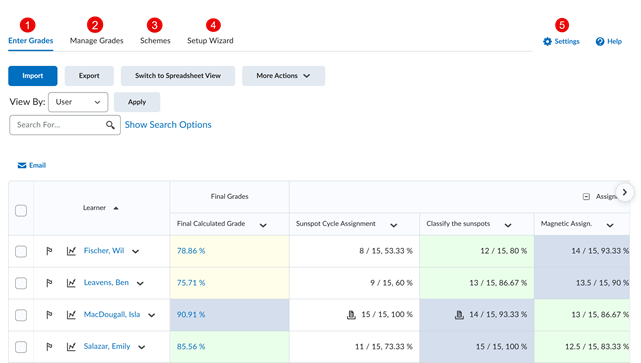
- Enter Grades: Review your learners' grades, import and export your grade book to Microsoft Excel or into a .CSV format, grade learner submissions, and manually enter or override grades. For more information, refer to Enter Grades in the Grades Tool.
- Manage Grades: Create new grade categories and grade items. For more information, refer to Manage Grades in the Grades tool.
- Schemes: View, create, and edit grading schemes that have been shared from a higher level in your organization.
- Setup Wizard: A seven-step setup wizard to help guide you to set up your initial grade book configuration. For more information, refer to Set up your Grade Book.
- Settings: Configure your personal display options, org unit (course) display options, and calculation options. For more information, refer to Define Settings in Grades tool.
Video: Overview of the Grades tool