Body
Learn how to buy Top Hat interactive eTextbooks, redeem access keys or bookstore codes, start a free trial, request a refund, and join your Top Hat course. This guide covers every enrollment scenario—from purchasing digital textbooks directly through a Top Hat course or catalog to applying access keys from your campus bookstore.
You’ll also find instructions for activating a 14-day free trial, troubleshooting common access errors, and requesting refunds for eligible purchases made through the Top Hat website. Whether you’re joining through a Join Code or browsing the catalog, we’ve got you covered.
Table of Contents
- Purchasing Top Hat eTextbooks
- Option 1: Through a Top Hat Course
- Option 2: Directly from Top Hat
- Campus Bookstore Codes
- 14-Day Free Trial
- Automatic Free Trials (Mobile Enrollment)
- Refunds
Purchasing Top Hat eTextbooks
Top Hat’s Interactive eTextbooks offer an immersive learning experience. In addition to reading materials, these digital textbooks include study tools and embedded assessments designed to increase engagement and comprehension—all within your Top Hat course.
Option 1: Purchase Through a Top Hat Course
This method applies when your instructor has adopted an Interactive eTextbook alongside a Top Hat course. You’ll gain access to both course features and the eTextbook in one purchase.
- Go to the Top Hat Registration page (opens in a new window).
- Join your course using your 6-digit Course Join Code, which can be found:
- In your course invitation email
- In the Course Lobby
- From your instructor
- Once enrolled, you’ll be prompted to:
- Pay with a credit card, or
- Redeem a pre-purchased access key
Top Hat Access Keys
Top Hat Access Keys (12–14 characters, starting with "U") allow students to access required materials.
Steps to Redeem Access Keys
- Sign into your Top Hat student account.
- Enroll in your course using the 6-digit Join Code.
- If prompted, enter the Access Key and select "Apply Access Key(s)".
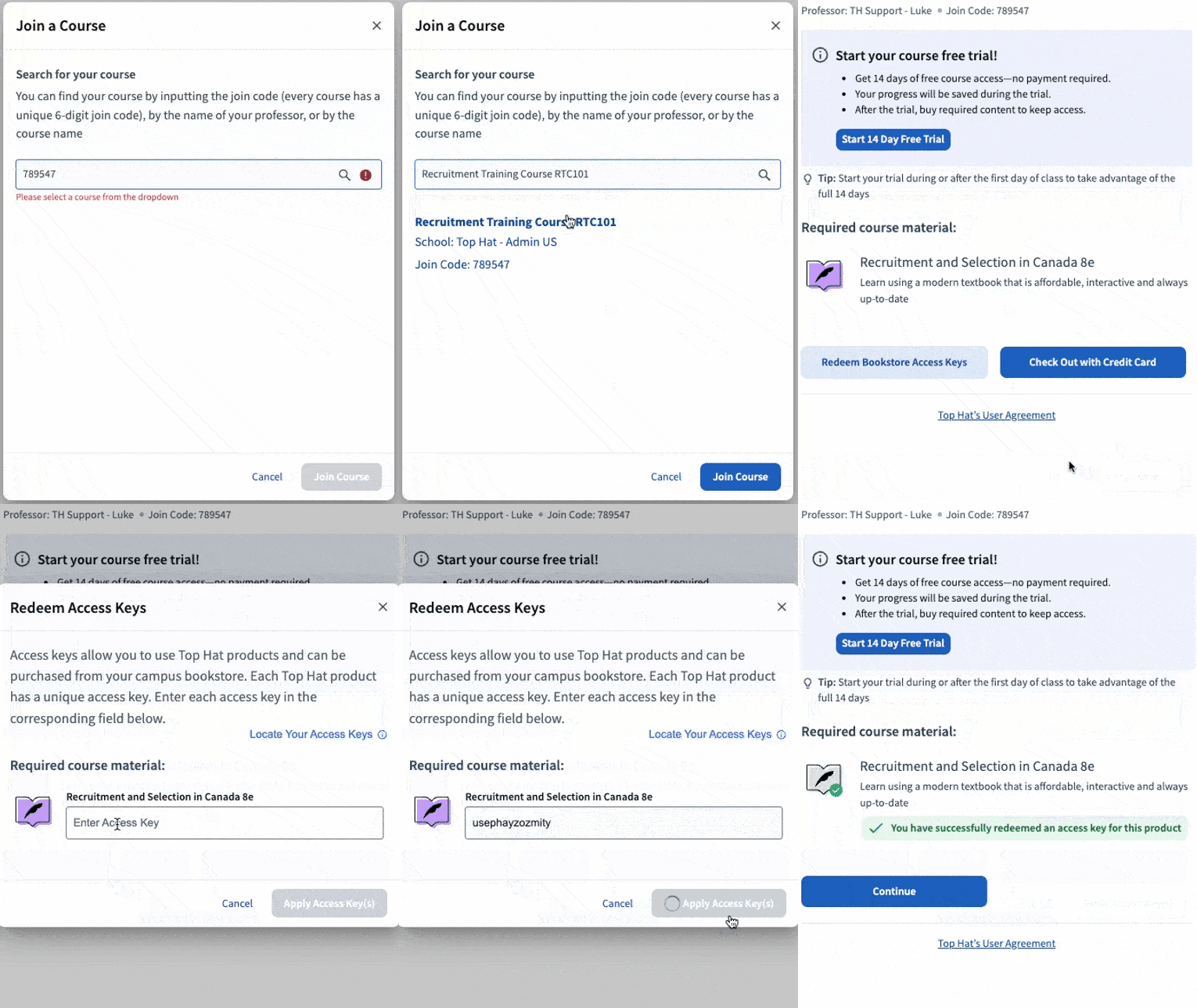 Image: Access Key entry field
Common Errors
- Incorrect or incomplete Access Key entry
- Using the wrong Access Key for your course
- Attempting to redeem a campus bookstore code directly on the Top Hat site (these must be redeemed through your bookstore first)
Need help redeeming an access key? Click here for a step-by-step guide (opens in a new window)
Subscription Options
- Choose from: One Semester, One Year, or Four Years (availability may vary by institution).
- Subscriptions do not auto-renew.
- We’ll send you a reminder 30 days before your subscription expires.
Note: If your instructor has assigned an Interactive eTextbook, it will appear as "Required" or "Optional" during the enrollment process. If marked optional, you can proceed with only a Top Hat Subscription if desired.
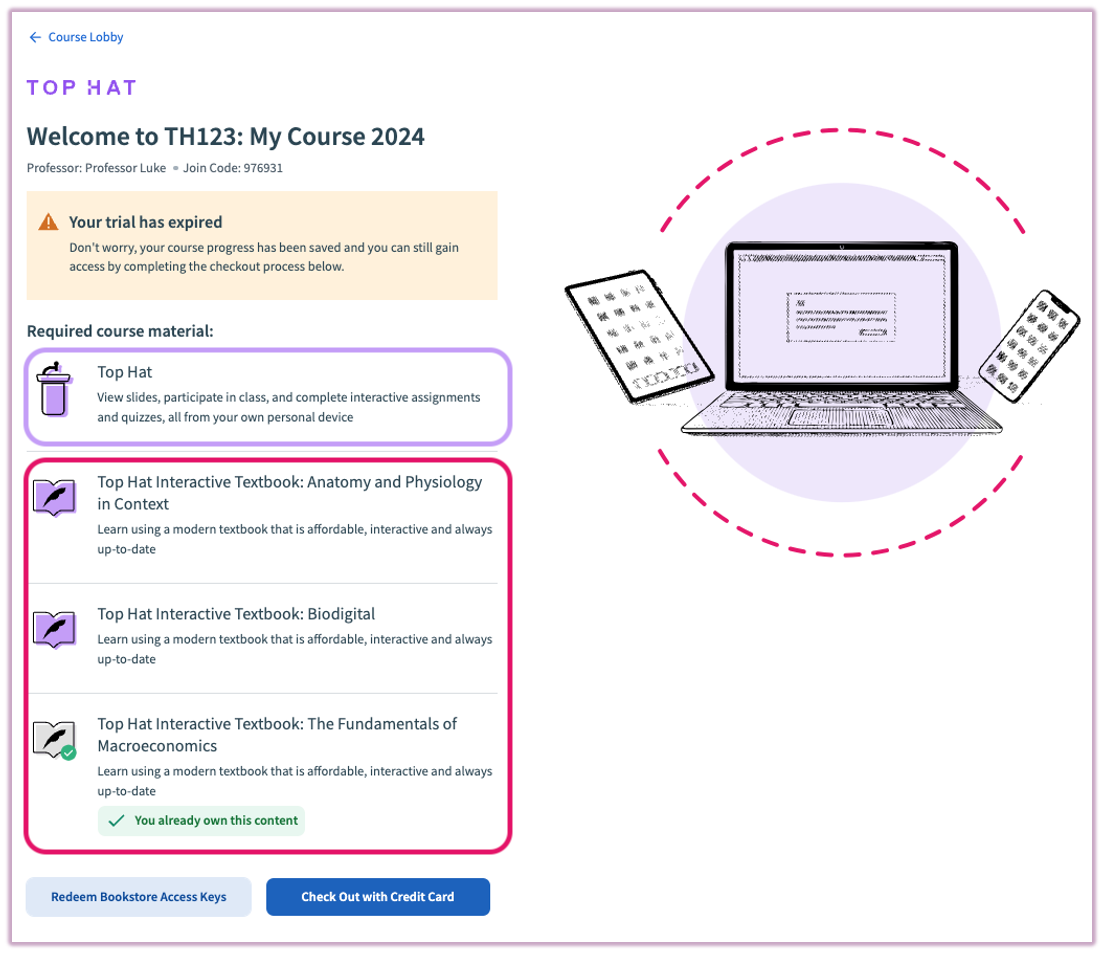 Image: Course Paywall and Check-Out Page with required materials
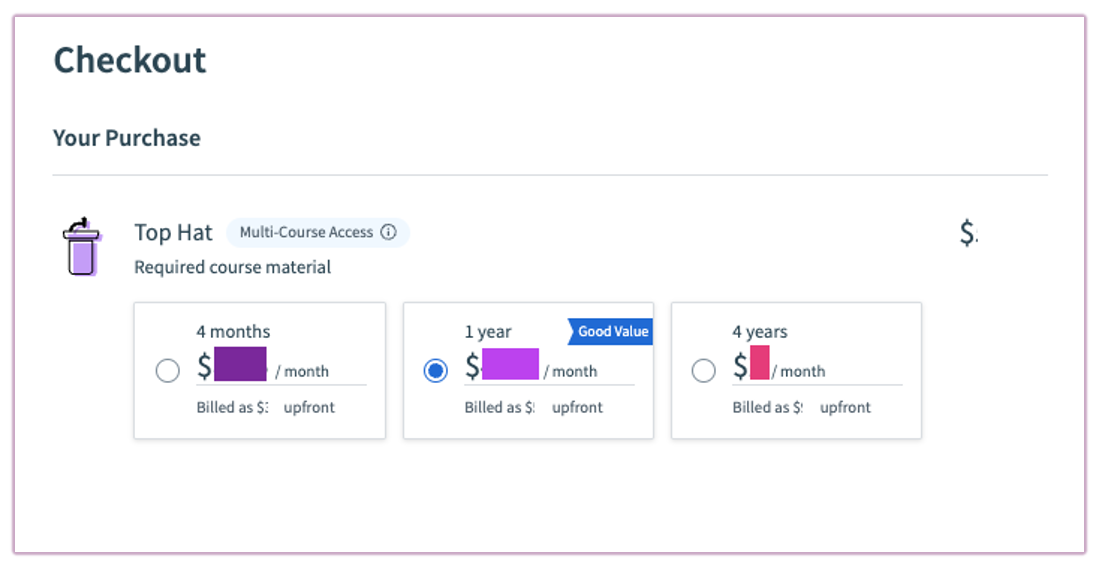 Image: Course Check-Out Page with Classroom options
Option 2: Purchase Directly from the Top Hat Catalog (eTextbook Only)
This method is for students who want access to a standalone Interactive eTextbook without joining a Top Hat course.
- Go to the Top Hat Catalog (opens in a new window).
- Search for the eTextbook by title.
- Select one of the following:
- "Student Buy Now" – for direct credit card purchases
- "Students with an Access Key Click Here" – for redeeming a bookstore access key
- When prompted, select "Student".
- Log in to your existing Top Hat account, or click "Create One" to sign up:
- Choose your school and follow the on-screen prompts.
- When asked for a course join code, select "Continue without a join code".
- Finish your setup by selecting:
- "Check Out with Credit Card" – if purchasing directly
- "Redeem Bookstore Access Key" – if using a redemption code
Related Support Articles:
Campus Bookstore Codes
Some campus bookstores provide Redemption Codes to exchange online for a Top Hat Access Key.
Important Information:
- Bookstore codes are not Access Keys and cannot be used directly on Top Hat.
- Follow the instructions provided by your bookstore to redeem your code.
- For assistance, contact Top Hat Support with the following:
- A picture of your purchase receipt.
- A picture or screenshot of the code.
- Your 6-digit Course Join Code.
Need further support with access keys and codes? Reach out via the contact form.
14-Day Free Trial
Top Hat offers a 14-day free trial for courses requiring paid products.
Important Note: Mobile App Course Enrollment
If you are enrolling in a paid course for the first time using the Top Hat mobile app, a 5-day free trial will automatically be applied to your account (some courses may be excluded). You can access your course during the trial, but purchases cannot be made in the mobile app.
When you’re ready to buy, open a web browser, go to your course, and select Purchase at the top of the screen. You can redeem a pre-purchased access key or pay by credit card. Redeeming an access key or making a payment will end the free trial immediately.
If you have already purchased Top Hat and are seeing the trial expiration message, you are most likely logged into a duplicate account. Please log out and back into the account where you made the purchase.
Key Details
- Free trials provide access to the course and assigned content, including eText chapters.
- Work and grades are saved even if the trial expires.
- Activate free trials through a web browser (not the mobile app).
Steps to Activate Free Trial
- Enroll in your course and select "Start 14-Day Free Trial".
- A confirmation window will show the required course materials.
- During the trial, you can purchase the materials using a credit card or a campus bookstore access key.
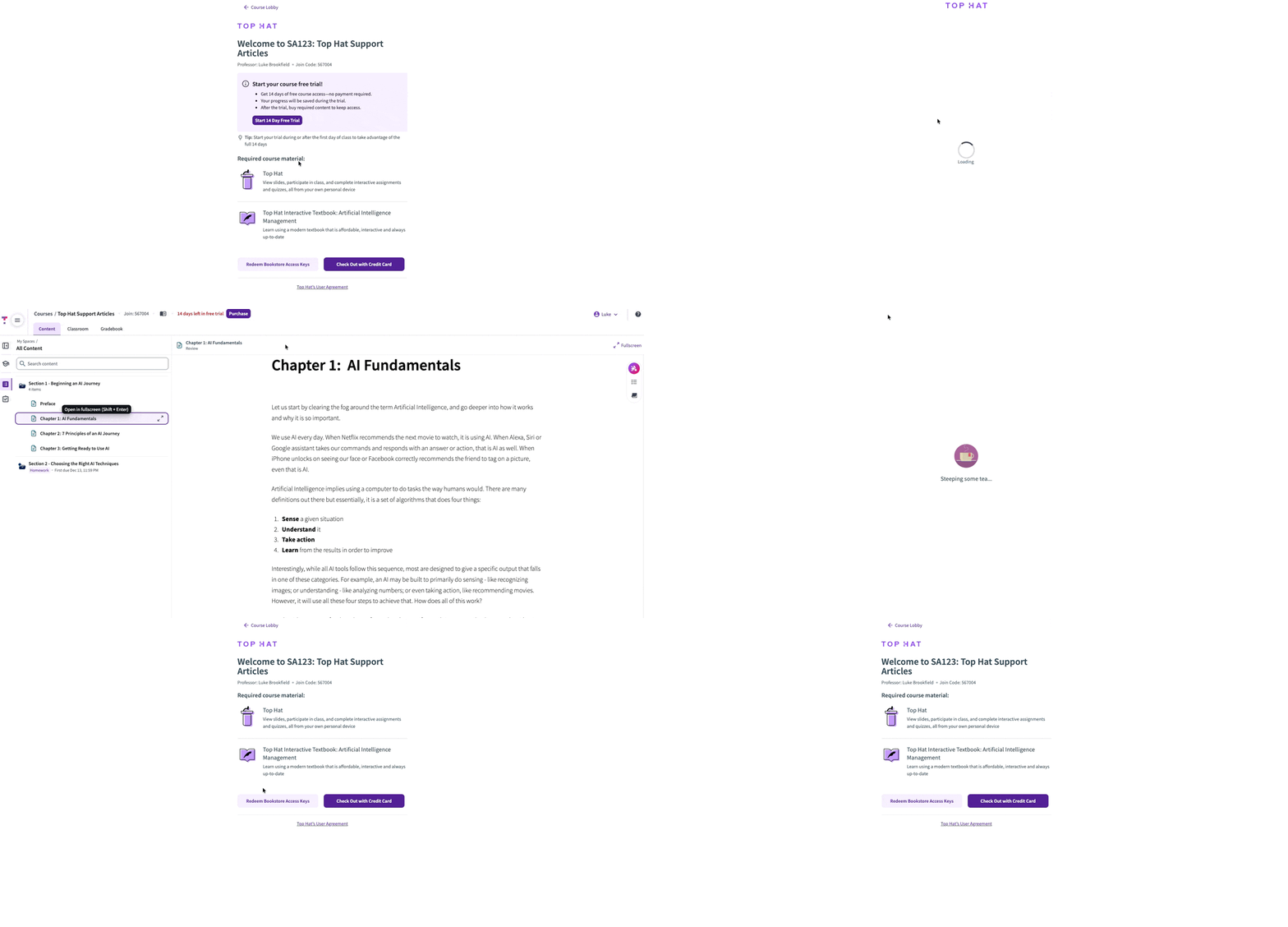 Image: How to start a 14-day free trial
Requesting a Refund
Top Hat offers refunds for products purchased directly from the website within 14 days of purchase.
Steps to Request a Refund
- Log into your Top Hat account on a web browser.
- Navigate to Account Settings by clicking your name in the top-right corner.
- Select Subscriptions & Purchased Content from the menu.
- Click the Request Refund button for the eligible product.
- Specify the refund type:
- Full Refund: Refunds all course purchases.
- Partial Refund: Select specific products to refund.
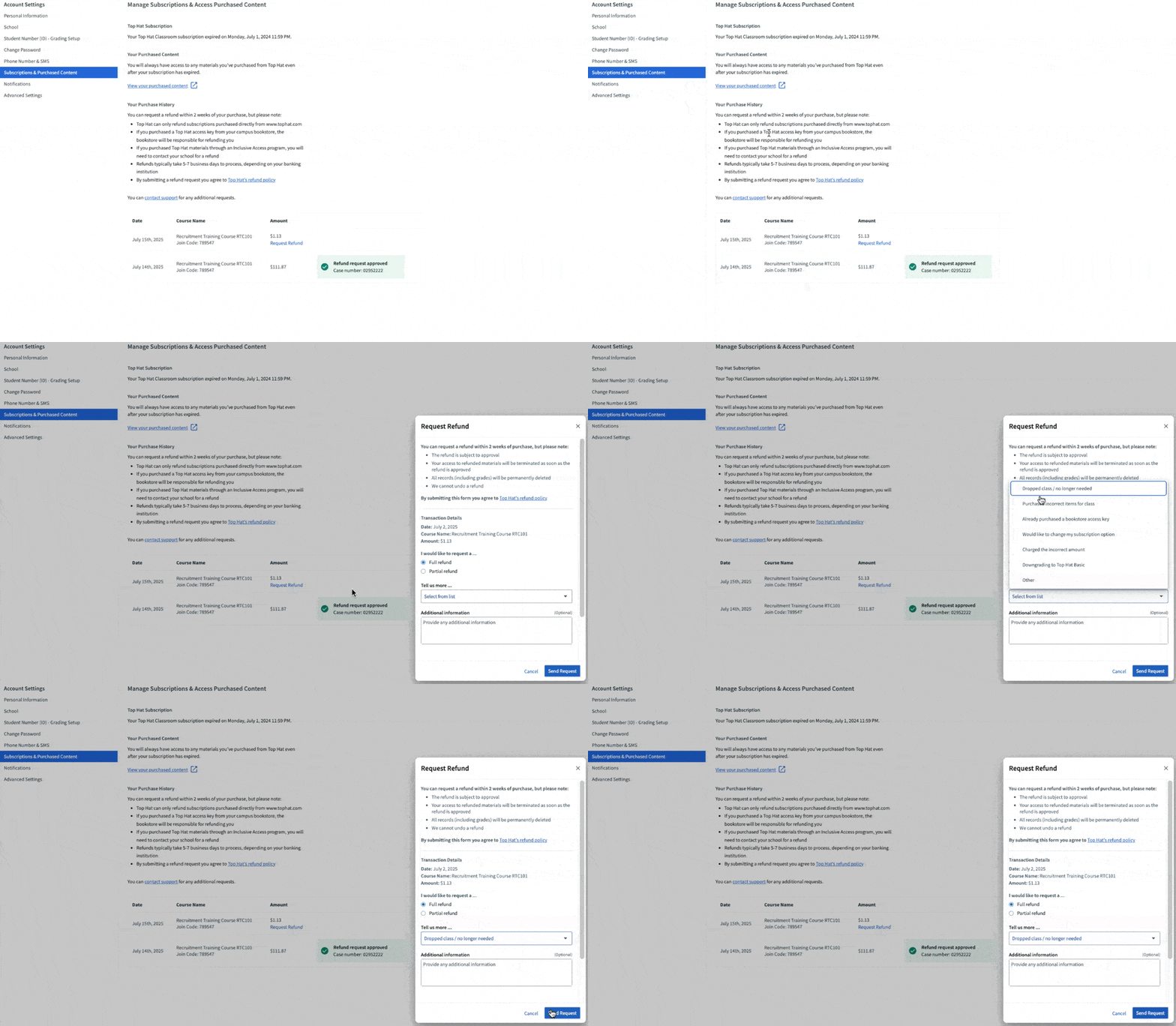 Image: Refund request interface in Account Settings
Important Notes:
- Refunds typically take 3–15 business days to process.
- Refunds are only available for purchases made directly on Top Hat. Bookstore purchases must be refunded by the bookstore.
- Once refunded, access to the product will be revoked, but your Top Hat account will remain active.
Related Support Articles:
If you do not receive your refund after 15 business days, contact Top Hat Support via the online support form.